

Download RightWebPage – ISO/IEC 23026 Web Compliance Checker
Overview
In today’s multi‑browser world, a website that looks perfect in Chrome but breaks in Safari can quickly erode user trust and hurt conversion rates. The root of many of these issues is non‑compliance with established web standards. RightWebPage is a lightweight desktop utility that helps developers, QA engineers, and even non‑technical site owners verify that their pages conform to the International Standard ISO/IEC 23026:2006.
This standard builds on the World Wide Web Consortium (W3C) guidelines and offers a clear set of recommended practices for intranet and extranet environments. By running a series of automated tests against a supplied URL, RightWebPage produces a detailed report that separates passed checks from failures, giving you a snapshot of where your site stands against the highest benchmark of web engineering.
The user interface is intentionally simple: launch the program, paste the URL you wish to audit, and click “Start Scan.” Within seconds, the engine crawls the page, evaluates elements such as document type declarations, character encoding, accessibility attributes (including TABINDEX and ARIA roles), CSS validation, and JavaScript best‑practice compliance.
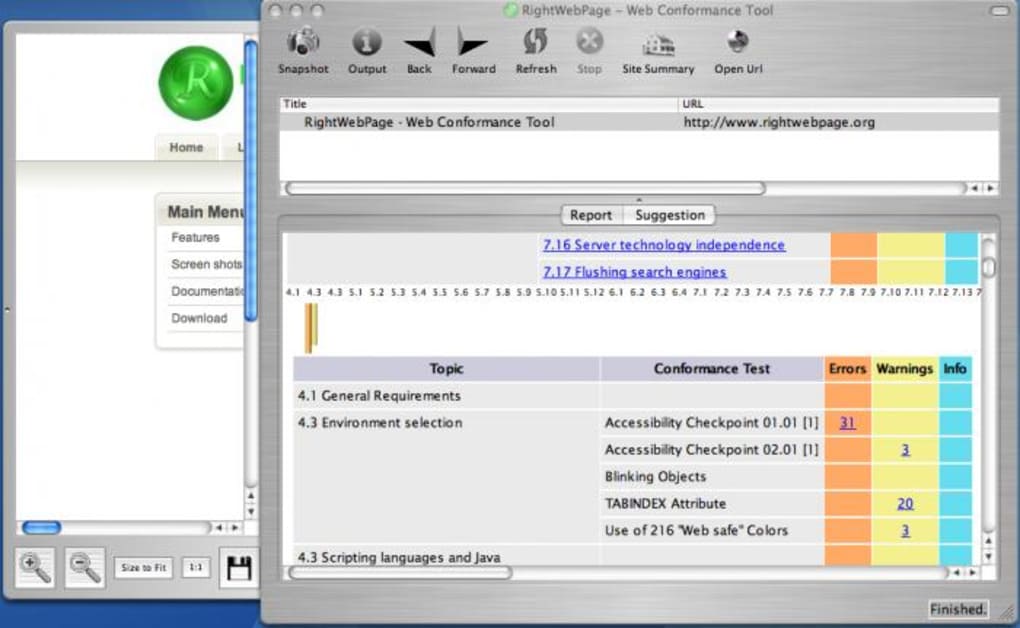
The resulting output includes a numeric score, color‑coded pass/fail indicators, and a log of technical messages that can be daunting for newcomers. While the tool does not currently include a built‑in glossary, the detailed error messages are directly linked to the ISO/IEC specification, enabling developers to look up definitions on the official website or in the standard’s documentation.
For organizations that must meet strict regulatory or contractual requirements—such as government portals, educational intranets, or multinational e‑commerce sites—RightWebPage offers an inexpensive way to prove compliance during internal audits or external vendor assessments.
The application runs on Windows, macOS, and Linux, and it can be launched as a portable executable, meaning you can carry it on a USB stick and run it on any compatible machine without a full installation. Whether you are troubleshooting a stubborn layout issue that appears only on legacy browsers, or you need to certify that a new public-facing site respects accessibility guidelines, RightWebPage provides a clear, repeatable testing process that reduces guesswork and accelerates remediation.
Key Features of RightWebPage
- ISO/IEC 23026:2006 Compliance Engine – Tests against the full set of recommended practices, including document structure, character set, and HTTP header validation.
- Accessibility Checks – Verifies TABINDEX order, ARIA attributes, alt‑text presence, and other WCAG‑aligned checkpoints.
- Cross‑Browser Rendering Validation – Simulates rendering in major browsers (Chrome, Firefox, Edge, Safari) to flag CSS and HTML that may cause inconsistent display.
- Detailed Reporting – Generates a color‑coded summary, a numeric compliance score, and a downloadable CSV/JSON log for integration with CI pipelines.
- Portable Execution – Available as a self‑contained executable for Windows, macOS, and Linux, eliminating the need for admin rights.
- Batch URL Scanning – Accepts a list of URLs (up to 500 per session) to streamline large‑scale site audits.
- Automatic Update Alerts – Notifies users when a new version of the standard or the tool itself is released.
- Secure Local Processing – All analysis is performed on the user’s machine; no data is transmitted to external servers, ensuring privacy for sensitive intranet sites.
These features combine to create a tool that is both powerful for seasoned developers and approachable for smaller teams that may lack deep standards expertise. The inclusion of batch scanning and exportable logs means RightWebPage can fit into continuous integration (CI) workflows, where automated compliance checks become part of every build. Meanwhile, the portable nature of the executable ensures that even on locked‑down corporate machines you can run a quick diagnostic without waiting for IT to approve a full installation. The emphasis on security—processing everything locally—addresses a common concern among enterprises that must keep internal site data confidential.
Installation & Usage Instructions
Getting started with RightWebPage is designed to be frictionless. Follow these steps to download, install, and run your first compliance scan:
- Download the Installer: Visit the official RightWebPage website and click the “Download for Windows/macOS/Linux” button that matches your operating system. The file size is under 15 MB, making it quick to download even on slower connections.
- Run the Installer (Optional): For Windows and macOS, you can choose the classic installer (.exe or .dmg) which will place a shortcut on your desktop and add the program to your start menu. Linux users can simply extract the tar.gz archive to a preferred location.
- Portable Mode: If you prefer not to install, unzip the portable package and launch
RightWebPage.exe(or the equivalent binary for macOS/Linux). No admin rights are required. - Configure Settings: On first launch, a brief wizard asks whether you want automatic update checks and where to store log files. You can accept the defaults or point the logs to a network share for team collaboration.
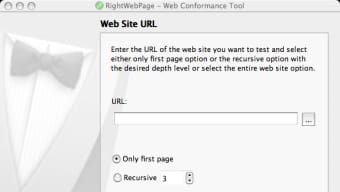
- Enter the URL: The main window presents a single input field labeled “Website URL.” Paste the full address (including http:// or https://) of the page you wish to test.
- Select Scan Options: Checkboxes allow you to enable or disable specific test groups—such as “Accessibility Only” or “Full ISO/IEC Scan.” For a comprehensive audit, leave all boxes checked.
- Start the Scan: Click the bright green “Start Scan” button. RightWebPage will fetch the page, parse the HTML, run the validation engine, and display progress in a status bar.
- Review Results: When the scan completes, a tabbed panel shows “Summary,” “Passes,” “Failures,” and “Raw Log.” The summary gives a quick compliance score (0–100) and highlights critical failures in red.
- Export or Share: Use the “Export” button to save the report as CSV or JSON. You can also copy a direct link to the HTML report for sharing with developers or stakeholders.
- Iterate: Fix the identified issues in your codebase, then re‑run the scan to verify that the changes have brought the page into compliance.
The entire process—from download to first report—typically takes under five minutes for a single page. For batch scans, the tool queues URLs and processes them sequentially, updating the progress bar for each site. Because the analysis runs locally, you can also work offline once the application is installed, making it ideal for secure environments where internet access is restricted.
System Compatibility, Pros and Cons
RightWebPage is built with cross‑platform compatibility in mind. Official binaries are provided for:
- Windows 10, 11 (64‑bit)
- macOS 10.15 Catalina and later (Intel & Apple Silicon)
- Linux distributions with glibc 2.28+ (Ubuntu 20.04, Fedora 33, Debian 10, etc.)
The application runs on any modern processor architecture (x86_64, ARM) and requires only 200 MB of free disk space and 150 MB of RAM during a full scan. Because it does not rely on external web services, firewall rules or proxy configurations do not interfere with its operation.
Pros
- Standards‑Focused: Directly maps test results to ISO/IEC 23026, providing clear compliance evidence.
- Portable Execution: No admin rights needed; great for locked‑down corporate machines.
- Comprehensive Accessibility Checks: Includes TABINDEX order, ARIA roles, and WCAG‑related validations.
- Exportable Reports: CSV and JSON formats enable integration with CI pipelines and issue trackers.
- Free Core Version: The base application is free, with optional paid modules for enterprise reporting.
Cons
- Learning Curve for Non‑Tech Users: Error messages reference technical terminology without an integrated glossary.
- Limited Real‑Time Browser Preview: The tool does not embed a live rendering engine; you must open a browser separately to view issues.
- No Automated Fixes: RightWebPage reports problems but does not provide one‑click remediation.
- Batch Scan Speed: Large batches (500+ URLs) can take several minutes per batch, depending on network latency.
Overall, the pros outweigh the cons for teams that prioritize strict standards compliance over quick visual debugging. The lack of an in‑app glossary can be mitigated by pairing RightWebPage with the publicly available ISO/IEC 23026 documentation or by using the export logs to feed into issue‑tracking systems where developers can annotate the findings.
Frequently Asked Questions
Is RightWebPage completely free to use?
The core application is free for personal and commercial use. Advanced reporting modules, multi‑user licensing, and priority support are offered as paid add‑ons.
Can RightWebPage test pages that require authentication?
Yes. The tool includes an optional “Authentication” tab where you can supply basic HTTP credentials or a cookie file for session‑based logins. This enables testing of intranet portals and staging environments.
Does the application support continuous integration (CI) pipelines?
RightWebPage can be invoked via command‑line arguments, making it suitable for Jenkins, GitHub Actions, or GitLab CI. The exported JSON report can be parsed by scripts to fail builds when compliance scores fall below a defined threshold.
What browsers does the cross‑browser validation emulate?
The validation engine uses the open‑source “Browserslist” database to compare HTML/CSS against the rendering capabilities of Chrome 115, Firefox 115, Safari 16, and Edge 115. It flags features that are unsupported or behave inconsistently across these browsers.
How does RightWebPage protect my data during scans?
All analysis is performed locally on your machine. No page content, screenshots, or logs are transmitted to external servers unless you manually upload the exported report. This design complies with strict data‑privacy policies for internal or government sites.
Can I schedule automatic scans?
While the GUI does not include a scheduler, you can create a simple batch script that runs RightWebPage with the desired URL list and set up a Windows Task Scheduler or cron job to execute it at regular intervals.
RightWebPage offers a practical balance between depth of standards coverage and ease of deployment. If you’re looking for a free, secure way to ensure that your intranet portals, public websites, or SaaS dashboards meet ISO/IEC 23026 and the broader W3C recommendations, this tool is worth a try. Download it today, run your first scan, and experience how a clear compliance score can accelerate your development cycles and improve user confidence across browsers.







